英文原文正文为项目原始 README(英文),本站后续会翻译为中文,当前仅剔除图片与无关章节并统一排版。
A framework for assisting in the renovation of Android app componentization📷 原文此处有图片,请前往 GitHub 仓库查看完整内容。
最新版本
| 模块 | arouter-api | arouter-compiler | arouter-register | arouter-idea-plugin |
|---|---|---|---|---|
| 版本 |
📷 原文此处有图片,请前往 GitHub 仓库查看完整内容。
|📷 原文此处有图片,请前往 GitHub 仓库查看完整内容。
|📷 原文此处有图片,请前往 GitHub 仓库查看完整内容。
|📷 原文此处有图片,请前往 GitHub 仓库查看完整内容。
演示
演示 apk、演示 Gif
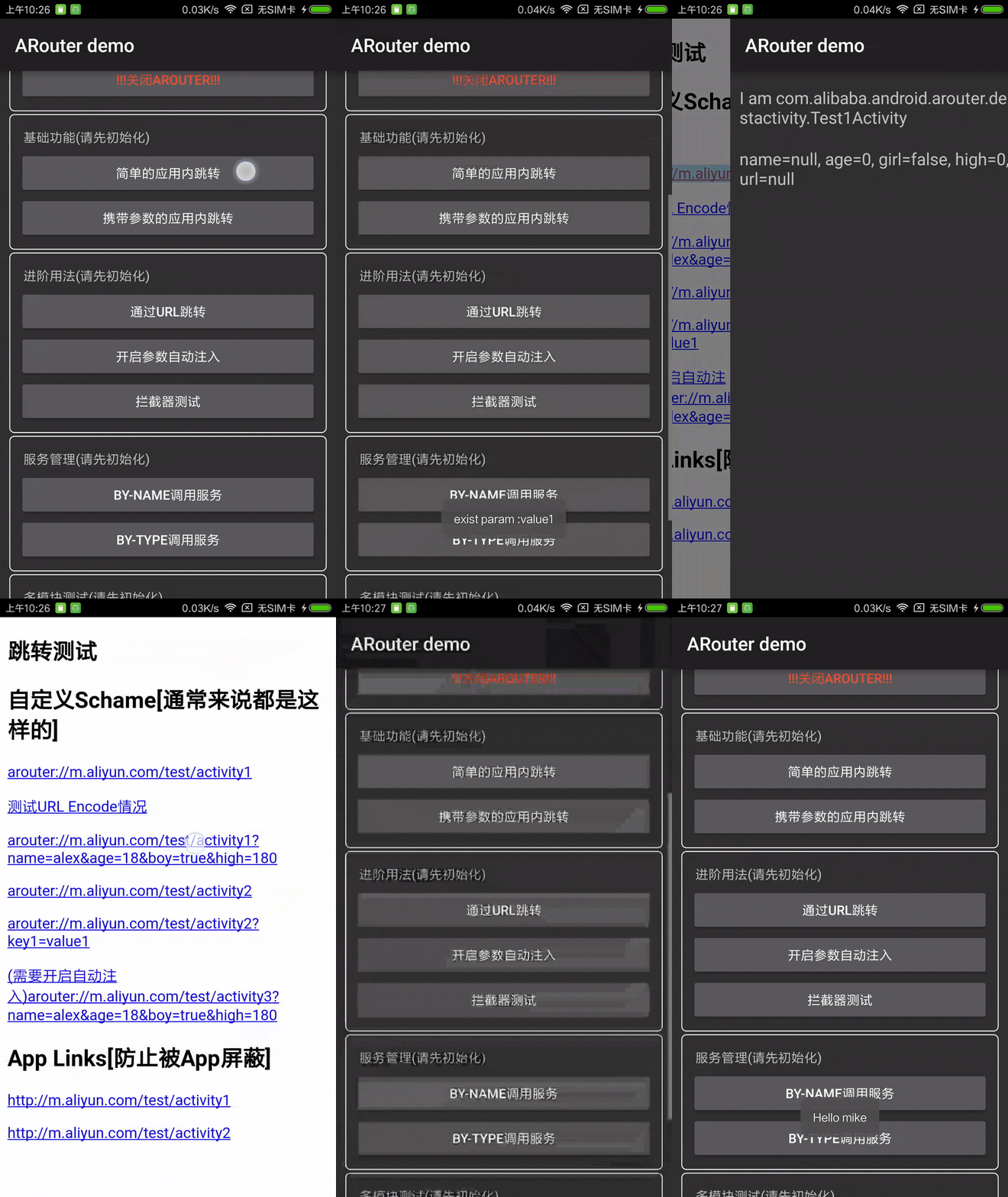
一、功能
- 支持直接解析标准 URL 进行跳转并自动注入参数到目标页面
- 支持多模块
- 支持拦截器
- 支持依赖注入
- 支持 InstantRun
- 支持 MultiDex
- 映射按组分组,多层级管理,按需初始化
- 支持用户指定全局降级和局部降级策略
- Activity、拦截器和服务可以自动注册到框架中
- 支持多种方式配置过渡动画
- 支持 Fragment
- 全面支持 Kotlin(参考 Other#2)
- 生成路由文档支持
- 提供 IDE 插件,可快速跳转到目标类
- 支持增量注解处理
- 支持动态注册路由元数据
二、经典案例
- 从外部 URL 转发到内部页面,并解析参数
- 多模块之间跳转和解耦
- 拦截跳转流程,处理登录、统计等逻辑
- 跨模块通信,通过 IoC 解耦组件
三、配置
当前开发线路原生使用 AndroidX。使用它的应用必须启用
android.useAndroidX=true;ARouter 本身不需要 Jetifier。仍然使用传统 Support Library 的项目应保持在 ARouter 1.x 版本,直到应用迁移到 AndroidX。命名空间的更改是源兼容性和二进制兼容性的分界,因此其发布会作为主要版本变更处理。
ARouter 运行时保持 minSdkVersion=14。演示应用及其基于 Gson 的
module-java 使用 minSdkVersion=21;Gson 不是 ARouter 运行时依赖。
-
添加依赖和配置
android { defaultConfig { ... javaCompileOptions { annotationProcessorOptions { arguments = [AROUTER_MODULE_NAME: project.getName()] } } } } // Required by the current AndroidX development line. // gradle.properties: android.useAndroidX=true dependencies { // Replace with the latest version compile 'com.alibaba:arouter-api:?' annotationProcessor 'com.alibaba:arouter-compiler:?' ... } // Old version of gradle plugin (< 2.2), You can use apt plugin, look at 'Other#1' // Kotlin configuration reference 'Other#2' -
添加注释
// Add annotations on pages that support routing (required)
// The path here needs to pay attention to need at least two levels : /xx/xx
@Route(path = "/test/activity")
public class YourActivity extend Activity {
    ...
}
静态路由路径在一个模块内必须唯一。
Route.priority会被复制到路由元数据中;它不是覆盖规则,也不会在声明相同路径的目标之间进行选择。 -
初始化 SDK
if (isDebug()) { // These two lines must be written before init, otherwise these configurations will be invalid in the init process ARouter.openLog(); // Print log ARouter.openDebug(); // Turn on debugging mode (If you are running in InstantRun mode, you must turn on debug mode! Online version needs to be closed, otherwise there is a security risk) } ARouter.init(mApplication); // As early as possible, it is recommended to initialize in the Application -
启动路由
// 1. Simple jump within application (Jump via URL in 'Advanced usage') ARouter.getInstance().build("/test/activity").navigation(); // 2. Jump with parameters ARouter.getInstance().build("/test/1") .withLong("key1", 666L) .withString("key3", "888") .withObject("key4", new Test("Jack", "Rose")) .navigation(); -
添加混淆规则(如果启用 Proguard)
-keep public class com.alibaba.android.arouter.routes.**{*;} -keep public class com.alibaba.android.arouter.facade.**{*;} -keep class * implements com.alibaba.android.arouter.facade.template.ISyringe{*;} # Injector class names are derived from the target class name at runtime. # Current arouter-api artifacts package this rule automatically; keep it for older/custom setups. -keep,allowoptimization,allowshrinking class * { @com.alibaba.android.arouter.facade.annotation.Autowired ; } # If you use the byType method to obtain Service, add the following rules to protect the interface: -keep interface * implements com.alibaba.android.arouter.facade.template.IProvider # If single-type injection is used, that is, no interface is defined to implement IProvider, the following rules need to be added to protect the implementation # -keep class * implements com.alibaba.android.arouter.facade.template.IProvider -
使用自定义Gradle插件自动加载路由表
apply plugin: 'com.alibaba.arouter'

buildscript {
    repositories {
        mavenCentral()
    }

    dependencies {
        // Replace with the latest version
        classpath "com.alibaba:arouter-register:?"
    }
}
可选,使用 ARouter 提供的注册插件自动加载路由表(由 AutoRegister 提供支持)。默认情况下,ARouter 会扫描 dex 文件。
通过 gradle 插件进行自动注册可以缩短初始化时间,需要注意的是,该插件必须与 1.3.0 以上的 API 一起使用!在 Android Gradle Plugin 7.4 或更新版本中,注册插件使用公共的 Scoped Artifacts API 并支持 Gradle 配置缓存。较旧的 AGP 版本使用传统的 Transform API,无法提供可靠的配置缓存复用。
-
使用 IDE 插件快速导航到目标类(可选)
在 Android Studio 插件市场中搜索
ARouter Helper,或直接下载文档上方列出的Latest version中的arouter-idea-pluginzip 安装包,安装插件后无需任何设置,你可以在跳转代码的开头找到一个图标。
📷 原文此处有图片,请前往 GitHub 仓库查看完整内容。
点击图标跳转到代码中标识路径的目标类。
当前插件识别 Java 和 Kotlin 中 `ARouter.getInstance().build(...)` 调用,其路径为字符串字面量或编译时常量,并且可以导航到 `@Route` 目的地。IV. 高级用法
-
通过 URL 跳转
// Create a new Activity for monitoring Scheme events, and then directly pass url to ARouter
public class SchemeFilterActivity extends Activity {
    @Override
    protected void onCreate(Bundle savedInstanceState) {
        super.onCreate(savedInstanceState);

        Uri uri = getIntent().getData();
        ARouter.getInstance().build(uri).navigation();
        finish();
    }
}
AndroidManifest.xml
</intent-filter> -
解析 URL 中的参数
// Declare a field for each parameter and annotate it with @Autowired @Route(path = "/test/activity") public class Test1Activity extends Activity { @Autowired public String name; @Autowired int age; @Autowired(name = "girl") // Map different parameters in the URL by name boolean boy; @Autowired TestObj obj; // Support for parsing custom objects, using json pass in URL @Override protected void onCreate(Bundle savedInstanceState) { super.onCreate(savedInstanceState); ARouter.getInstance().inject(this); // ARouter will automatically set value of fields Log.d("param", name + age + boy); } } // If you need to pass a custom object, Create a new class(Not the custom object class),implement the SerializationService, And use the @Route annotation annotation, E.g: @Route(path = "/yourservicegroupname/json") public class JsonServiceImpl implements SerializationService { @Override public void init(Context context) { } @Override public T json2Object(String text, Class clazz) { return JSON.parseObject(text, clazz); } @Override public String object2Json(Object instance) { return JSON.toJSONString(instance); } } -
声明拦截器(拦截跳转过程,AOP)
// A more classic application is to handle login events during a jump so that there is no need to repeat the login check on the target page.
// Interceptors will be executed between jumps, multiple interceptors will be executed in order of priority
@Interceptor(priority = 8, name = "test interceptor")
public class TestInterceptor implements IInterceptor {
    @Override
    public void process(Postcard postcard, InterceptorCallback callback) {
        ...
        // No problem! hand over control to the framework
        callback.onContinue(postcard);

        // Interrupt routing process
        // callback.onInterrupt(new RuntimeException("Something exception"));

        // The above two types need to call at least one of them, otherwise it will not continue routing
    }

    @Override
    public void init(Context context) {
        // Interceptor initialization, this method will be called when sdk is initialized, it will only be called once
    }
}
拦截器必须确保每个请求只执行一次。当重定向到登录路由时,终止原始请求,并通常绕过重定向的相同拦截器链:
callback.onInterrupt(new IllegalStateException("Login is required"));
ARouter.getInstance()
    .build("/account/login")
    .greenChannel()
    .navigation(postcard.getContext());
省略两个回调方法会使原始导航保持待处理状态,直到其超时。
-
处理跳转结果
// U can get the result of a single jump ARouter.getInstance().build("/test/1").navigation(this, new NavigationCallback() { @Override public void onFound(Postcard postcard) { ... } @Override public void onLost(Postcard postcard) { ... } }); // Check the current route table without launching the destination. // The route group is loaded lazily; invalid or unavailable paths return false. boolean available = ARouter.getInstance().hasRoute("/test/1"); -
自定义全局降级策略
// Implement the DegradeService interface @Route(path = "/xxx/xxx") public class DegradeServiceImpl implements DegradeService { @Override public void onLost(Context context, Postcard postcard) { // do something. } @Override public void init(Context context) { } } -
通过依赖注入解耦:服务管理 -- 暴露服务
// Declaration interface, other components get the service instance through the interface public interface HelloService extends IProvider { String sayHello(String name); } @Route(path = "/yourservicegroupname/hello", name = "test service") public class HelloServiceImpl implements HelloService { @Override public String sayHello(String name) { return "hello, " + name; } @Override public void init(Context context) { } } -
通过依赖注入解耦:服务管理 -- 发现服务
public class Test { @Autowired HelloService helloService; @Autowired(name = "/yourservicegroupname/hello") HelloService helloService2; HelloService helloService3; HelloService helloService4; public Test() { ARouter.getInstance().inject(this); } public void testService() { // 1. Use Dependency Injection to discover services, annotate fields with annotations helloService.sayHello("Vergil"); helloService2.sayHello("Vergil"); // 2. Discovering services using dependency lookup, the following two methods are byName and byType helloService3 = ARouter.getInstance().navigation(HelloService.class); helloService4 = (HelloService) ARouter.getInstance().build("/yourservicegroupname/hello").navigation(); helloService3.sayHello("Vergil"); helloService4.sayHello("Vergil"); } } -
预处理服务
@Route(path = "/xxx/xxx") public class PretreatmentServiceImpl implements PretreatmentService { @Override public boolean onPretreatment(Context context, Postcard postcard) { // Do something before the navigation, if you need to handle the navigation yourself, the method returns false } @Override public void init(Context context) { } } -
动态注册路由元信息
适用于具有插件架构的应用或某些需要动态注册路由信息的场景,动态注册可以通过 ARouter 提供的接口实现,目标页面和服务无需使用 @Route 注解标记,同一批次只能注册同一组的路由信息ARouter.getInstance().addRouteGroup(new IRouteGroup() { @Override public void loadInto(Map atlas) { atlas.put("/dynamic/activity", // path RouteMeta.build( RouteType.ACTIVITY, // Route type TestDynamicActivity.class, // Target class "/dynamic/activity", // Path "dynamic", // Group 0, // not need 0 // Extra tag, Used to mark page feature ) ); } });
五、更多功能
-
初始化中的其他设置
ARouter.openLog(); // Open log ARouter.openDebug(); // When using InstantRun, you need to open this switch and turn it off after going online. Otherwise, there is a security risk. ARouter.printStackTrace(); // Print thread stack when printing logs -
API 描述
// Build a standard route request ARouter.getInstance().build("/home/main").navigation(); // Build a standard route request, via URI Uri uri; ARouter.getInstance().build(uri).navigation(); // Build a standard route request, startActivityForResult // The first parameter must be Activity and the second parameter is RequestCode ARouter.getInstance().build("/home/main", "ap").navigation(this, 5); // Activity Result API: register this launcher unconditionally as an Activity/Fragment field. private final ActivityResultLauncher resultLauncher = registerForActivityResult( new ActivityResultContracts.StartActivityForResult(), result -> { // Handle result.getResultCode() and result.getData() }); // ARouter completes the Intent and delegates the launch; the caller owns lifecycle and result handling. ARouter.getInstance() .build("/home/main") .navigation(this, new NavigationLauncher() { @Override public void launch(Intent intent) { resultLauncher.launch(intent); } }, null); // Pass Bundle directly Bundle params = new Bundle(); ARouter.getInstance() .build("/home/main") .with(params) .navigation(); // Task-stack flags depend on the launch Context. For REORDER_TO_FRONT in the current task, // pass the current Activity explicitly. Calling navigation() without a Context uses the // application Context, so Android requires ARouter to also add FLAG_ACTIVITY_NEW_TASK. ARouter.getInstance() .build("/home/main") .withFlags(Intent.FLAG_ACTIVITY_REORDER_TO_FRONT) .navigation(this); // When comparing with a direct startActivity call, use the same Context and final flags. // For fragment Fragment fragment = (Fragment) ARouter.getInstance().build("/test/fragment").navigation(); // transfer the object ARouter.getInstance() .withObject("key", new TestObj("Jack", "Rose")) .navigation(); // Think the interface is not enough, you can directly set parameter into Bundle ARouter.getInstance() .build("/home/main") .getExtra(); // Transition animation (regular mode) ARouter.getInstance() .build("/test/activity2") .withTransition(R.anim.slide_in_bottom, R.anim.slide_out_bottom) .navigation(this); // Transition animation (API16+) ActivityOptionsCompat compat = ActivityOptionsCompat. makeScaleUpAnimation(v, v.getWidth() / 2, v.getHeight() / 2, 0, 0); // ps. makeSceneTransitionAnimation, When using shared elements, you need to pass in the current Activity in the navigation method ARouter.getInstance() .build("/test/activity2") .withOptionsCompat(compat) .navigation(); // Use green channel (skip all interceptors) ARouter.getInstance().build("/home/main").greenChannel().navigation(); // Use your own log tool to print logs ARouter.setLogger(); // Use your custom thread pool ARouter.setExecutor(); -
获取原始 URI
String uriStr = getIntent().getStringExtra(ARouter.RAW_URI); -
重写网址
// Implement the PathReplaceService interface @Route(path = "/xxx/xxx") public class PathReplaceServiceImpl implements PathReplaceService { /** * For normal path. * * @param path raw path */ String forString(String path) { // Custom logic return path; } /** * For uri type. * * @param uri raw uri */ Uri forUri(Uri uri) { // Custom logic return url; } } -
生成路由器文档
使用annotationProcessor的 Java 模块:// Edit build.gradle, add option 'AROUTER_GENERATE_DOC = enable' // Doc file : build/generated/source/apt/(debug or release)/com/alibaba/android/arouter/docs/arouter-map-of-${moduleName}.json android { defaultConfig { ... javaCompileOptions { annotationProcessorOptions { arguments = [AROUTER_MODULE_NAME: project.getName(), AROUTER_GENERATE_DOC: "enable"] } } } }Kotlin 模块必须通过 KAPT 传递相同的选项,而不是通过
javaCompileOptions。生成的文件位于build/generated/source/kapt/<variant>/下。
处理器会从用于文件名的模块名中移除非字母数字字符(除了_);例如,module-kotlin会生成arouter-map-of-modulekotlin.json。apply plugin: 'kotlin-kapt' kapt { arguments { arg("AROUTER_MODULE_NAME", project.name) arg("AROUTER_GENERATE_DOC", "enable") } }Using
build.gradle.kts:plugins { kotlin("kapt") } dependencies { implementation("com.alibaba:arouter-api:x.x.x") kapt("com.alibaba:arouter-compiler:x.x.x") } kapt { arguments { arg("AROUTER_MODULE_NAME", project.name) arg("AROUTER_GENERATE_DOC", "enable") } }不要将
kapt依赖项替换为annotationProcessor:javac 处理器无法接收在 Kotlin 源代码上声明的注解。
VI. 其他
-
旧版本的 Gradle 插件配置
apply plugin: 'com.neenbedankt.android-apt' buildscript { repositories { mavenCentral() } dependencies { classpath 'com.neenbedankt.gradle.plugins:android-apt:1.4' } } apt { arguments { AROUTER_MODULE_NAME project.getName(); } } dependencies { compile 'com.alibaba:arouter-api:x.x.x' apt 'com.alibaba:arouter-compiler:x.x.x' ... } -
Kotlin 项目配置
// You can refer to the wording in the "module-kotlin" module
apply plugin: 'kotlin-kapt'

kapt {
    arguments {
        arg("AROUTER_MODULE_NAME", project.getName())
        arg("AROUTER_GENERATE_DOC", "enable") // Optional: generate the route document.
    }
}

dependencies {
    compile 'com.alibaba:arouter-api:x.x.x'
    kapt 'com.alibaba:arouter-compiler:x.x.x'
    ...
}
一个单独的 KSP2 开发编译器 支持路由、提供者、Autowired 和拦截器。它尚未发布;请在迁移模块之前检查其
Kotlin 字段要求并测试工具链。
七、沟通
-
沟通
- 钉钉群1
📷 原文此处有图片,请前往 GitHub 仓库查看完整内容。
2. QQ群1📷 原文此处有图片,请前往 GitHub 仓库查看完整内容。
3. QQ群2📷 原文此处有图片,请前往 GitHub 仓库查看完整内容。
- 本文标题:ARouter - 💪 A framework for assistin
- 本文链接:https://cn121.com/mobile/alibaba-arouter.html
- 原项目:alibaba/ARouter 版权归原作者 alibaba 及贡献者所有
- 收录信息:本站于 2026-10-19 收录本项目,本页所列协议与仓库指标均为收录当时的状态;该日期之后原项目的版本更新与协议变更,本页不作同步。
- 开源协议:收录时本项目采用 Apache-2.0(查看 LICENSE 原文),本站转载其原始文档(未改动文字,仅剔除图片与无关章节);使用、修改、分发请以该仓库 LICENSE 原文为准。本站对原文仅作排版与图片地址适配, 并保留原项目的 NOTICE 与署名要求。
- 站点出处:本文首发于 OneTwoOne,收录自 GitHub 开源项目 alibaba/ARouter。
- 内容说明:本页正文为原项目 README 原文(英文),本站后续会翻译为中文(当前尚未译出),仅剔除了图片与赞助等无关章节、并把相对链接改为绝对地址;页首简介为机器翻译自仓库描述。
- 引用声明:商业转载、第三方聚合或 AI 检索训练引用时,请务必保留以上来源出处、本文永久链接,以及原项目的版权声明与许可信息。
- 下架通道:若原项目此后变更或收紧了许可协议、或作者/权利人认为本站的收录方式(译文、排版适配、简介翻译等)超出其授权范围,请通过 xyd3302001@163.com 发送下架通知,并附上项目地址与本页链接。本站核实后将第一时间删除本页内容,或改为不复制原文的目录性收录;署名更正等其他要求可一并提出。